




Access your information with the TSA Portal
TSA Portal gives you more control over your information and helps us ensure we’re providing the right support, information and opportunities to you.
Log into the TSA Portal by clicking here.
It’s a one-stop place to see and update your: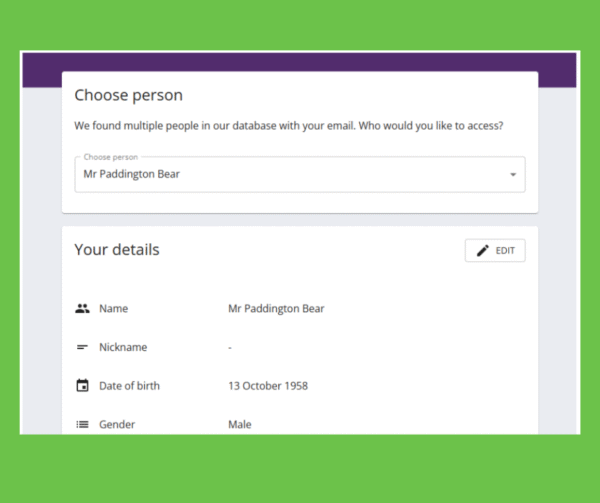
- Contact details
- Preferences for keeping in touch
- TSA donations and Gift Aid declarations
- TSA event sign-up details (like dietary or allergy information)
TSA Portal should also mean that you don’t miss anything you’re signed up to, like our newsletters, and have more control of your data.
Even small updates to your TSA Portal make a big difference to how we understand and support the TSC community.
What you’ll see when you sign in
You’ll need to enter the email you use to communicate with The TSA. A link and four-digit pin number will be sent to this email. Click the link entering the pin number found in the same email to view your portal.
When you’re signed in, you’ll see that there are these sections to your portal page:
- Your details
- Me and TSC
- Keeping in touch
- The TSA events
- Your The TSA contributions
- Gift Aid Declaration
- Your The TSA legacy
- Portal confirmation (tick this box to confirm your changes).
Please feel free to log in and review and edit your information. In the future, we’ll use TSA Portal to help you view and manage other details including your Big Day event information and The TSA Support Fund applications.
Contact details with the same email address
Once you log in, you may notice that multiple names are linked to your email address. If you’ve got more than one person registered to your email you will be asked to select the person you would like to view/edit.
Some families share one email address, so you may see:
- A parent
- A child
- A partner
- Another family member
It’s really important to check each name linked to your email and make sure the information for every person is correct and up to date.
Frequently asked questions
Q. It didn’t recognise my email address.
A. It looks like we don’t have the email address you entered on file. If you have other email accounts, we suggest trying them alternatively you can register your email by clicking here.
Q. I can’t see my information?
A. Is there a drop-down box on the name field or if you have other email accounts, we suggest trying to log in with them.
Q. My login code isn’t working?
A. For security reasons you will be given a new login code every time you log in to the portal, a login code will only work for 60 minutes. After 60 minutes you will need to sign in again with your email.
Q. Can I update this information
A. Yes, you will see an edit button on each data box if you click this, it will allow you to edit some of the data. If you change your email this will be the email address, you will need to log in with in future.
Q. I can’t see my donations.
A. The portal is currently only showing donations made this year. If you have donated to The TSA in 2026, don’t worry we can link your payment to your portal. Please use the Portal Query form below to provide details on your missing donations. Ensure you add the date paid, amount, method of payment and a reference number if available.
If we have been unable to answer your question, please complete the Portal Query form by clicking here.. Alternatively, you can email your query to admin@tuberous-sclerosis.org or call us on 0300 222 5737.
Make a one off or regular donation
£10 Can allow us to send a welcome pack to a family who has just received a life-changing TSC diagnosis, ensuring that they do not go through this time alone.
£25 Can help us develop materials that are included in our support services, flagship events or campaigns.
£50 Can provide laboratory equipment for a day’s research into the causes, symptoms, management or treatment of TSC.

To provide help for today and a cure for tomorrow